// BLOG
Run Local Akka.NET Clusters with Aspire
Official, first-party Aspire support for Akka.NET, new in Akka.Management 1.5.70
One of the complaints we’ve heard for years from Akka.NET developers is “it’s hard to debug Akka.NET clusters locally.”
For a long time there were manual work-arounds and techniques such as using multiple launchSettings.json profiles and launching a seed node first, followed by other Akka.Cluster nodes later, from IDEs like Visual Studio and JetBrains Rider.
Microsoft developed Aspire a couple of years ago, aimed at making it easy to orchestrate distributed applications locally using declarative programming in languages like C#. It is a massive productivity booster and you should read my personal blog post, “Stop Failing The git clone && run Test,” which describes how Aspire improves developer productivity, end-to-end testing, and CI/CD enablement.
We developed a set of Akka.Aspire plugins and have been using them internally for months - we’ve just recently made them officially supported plugins (thus, covered by our Akka.NET Support Plans) and they are now available for general use!
We’re going to talk about using them in this post and how they can help your team debug and run clustered Akka.NET applications more easily locally. This is doubly or triply important if you’re using AI coding agents to develop your organization’s software, as Aspire’s Model Context Protocol (MCP) endpoints1 make it very easy for coding agents to access OpenTelemetry, log, and healthcheck data about your applications and their exposed resources.
Installing Akka.Aspire Packages
The source code for Akka.NET’s Aspire integration lives inside the Akka.Management repository, and from it we ship two packages:
Akka.Aspire.Hosting- configures the AspireAppHost, which we use to launch our Akka.NET applications and all of their dependencies andAkka.Aspire- this is the Aspire client code, which is used to help configure Akka.Hosting to consume the configuration generated byAkka.Aspire.Hosting.
We’ve also updated our dotnet new templates for Akka.NET to use Akka.Aspire for our “big” template, the “Akka.Cluster Web API Template” - so if you want to scaffold a working Aspire-ified Akka.NET application from scratch, do the following:
dotnet new install "Akka.Templates::*"
dotnet new akka.cluster.webapi -n "your project name"
And you should be all set!
Let’s dive into what these plugins do and how they work with Aspire to give you a “pit of success” experience just like Akka.Hosting does.
Aspire Makes the Local Topology Executable
As I mentioned at the top of the article, the biggest innovation Akka.Aspire and Akka.Aspire.Hosting bring to the table is making it very easy to deploy and debug multi-node and even multi-service Akka.NET clusters locally.
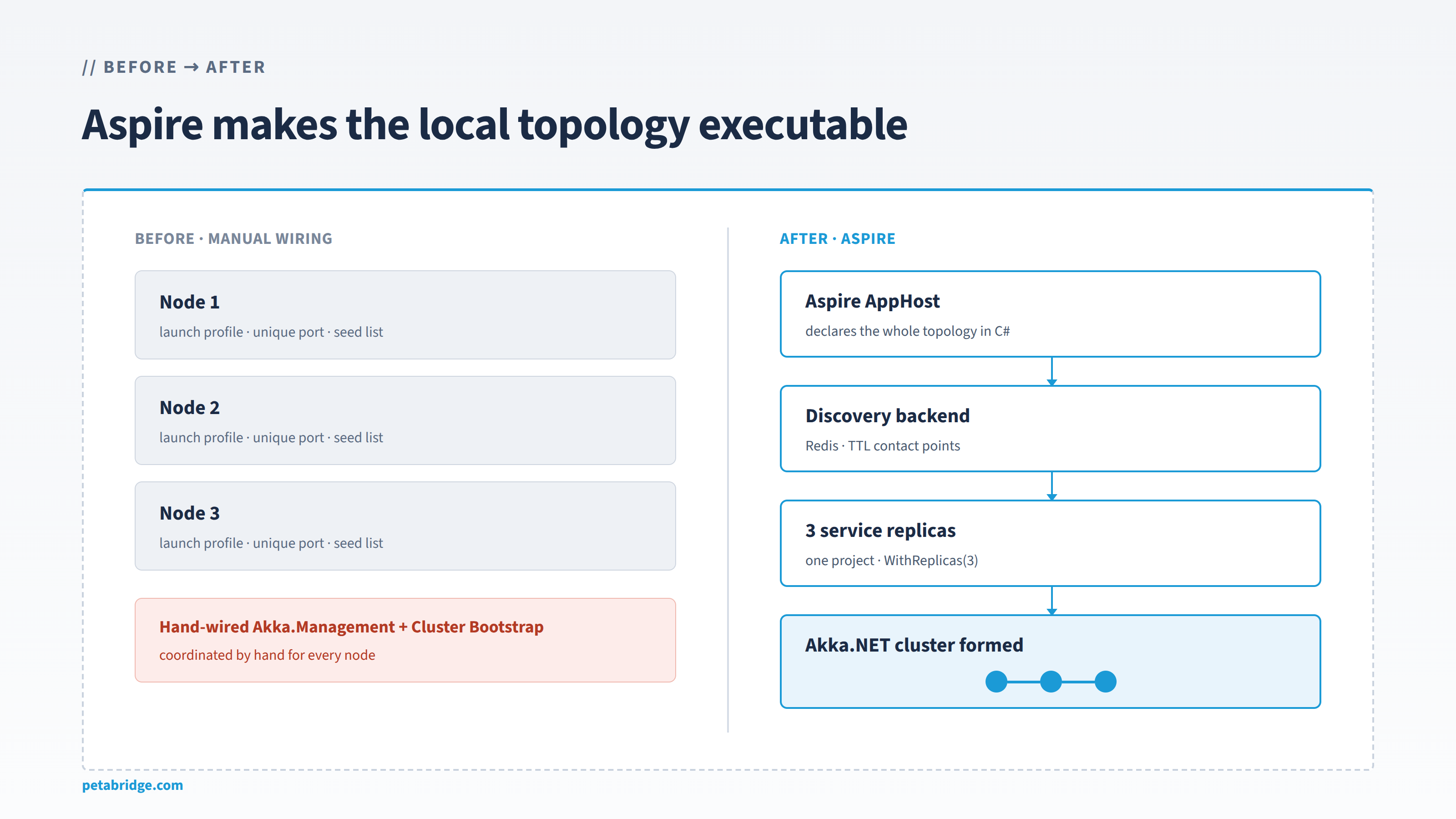
To run Akka.NET with Aspire, you need to create an .AppHost program that the Aspire tooling will use to orchestrate your application:
using Akka.Aspire.Hosting;

var builder = DistributedApplication.CreateBuilder(args);

var redis = builder.AddRedis("akka-discovery");

var akka = builder.AddAkka("sample-cluster")
    .WithClustering(redis);

builder.AddProject<Projects.Akka_Aspire_Sample_Service>("service")
    .WithHttpEndpoint(name: "http")
    .WithReplicas(3)
    .WithReference(akka);

builder.Build().Run();
This is a real sample from the Akka.Management repository and it is this easy!
Akka.Aspire.Hosting uses Akka.Management and Akka.Discovery to dynamically form a cluster - so the primary resource we need to register to make this work is a discovery mechanism.
In this case, we’re using a Redis database (AddRedis) which we’ll use in concert with Akka.Discovery.Redis2 to allow all of the nodes in our Akka.NET cluster to find each other.
Next, we need to declare an Akka.NET cluster as a shared resource between applications. We do this so you can have multiple applications in the same solution join the same cluster with variable numbers of replicas.
var akka = builder.AddAkka("sample-cluster")
    .WithClustering(redis);
The WithClustering call today takes either a Redis resource or an Azure Table Storage resource, which will use the Akka.Discovery.Azure plugin under the covers when we configure your ActorSystem using the Akka.Aspire client plugin.
Here’s what that looks like (in one of the other Aspire samples in the Akka.Management repository):
using Akka.Aspire.Hosting;

var builder = DistributedApplication.CreateBuilder(args);

var storage = builder.AddAzureStorage("azure-storage").RunAsEmulator();
var tables = storage.AddTables("akka-discovery");

var akka = builder.AddAkka("sample-cluster")
    .WithClustering(tables);

builder.AddProject<Projects.Akka_Aspire_Sample_Azure_Service>("service")
    .WithHttpEndpoint(name: "http")
    .WithReplicas(3)
    .WithReference(akka);

builder.Build().Run();
We might add support for more discovery providers in the future, but Redis and Azure Table Storage are the only two that are dynamic and can run easily on a developer’s laptop today (the Amazon Web Services and Kubernetes ones obviously require those environments.)
How the Cluster Forms Under Aspire
How do these Akka.Aspire plugins actually form an Akka.NET cluster?
First we need to integrate the Akka.Aspire client package into our Akka.Hosting configuration for each service3:
builder.Services.AddAkka("SampleSystem", (akkaBuilder, sp) =>
{
    akkaBuilder.ConfigureLoggers(setup =>
    {
        setup.ClearLoggers();
        setup.AddLoggerFactory();
    });

    akkaBuilder.WithAspireClusterBootstrap(sp,
        configureDiscovery: (b, config) =>
        {
            // The AppHost injects the discovery resource's name; fall back to the literal for clarity.
            var connectionStringName = config["Akka:Cluster:Clustering:ConnectionStringName"] ?? "akka-discovery";
            var redisConn = config.GetConnectionString(connectionStringName);
            if (!string.IsNullOrEmpty(redisConn))
                b.WithRedisDiscovery(redisConn, config["Akka:Cluster:ServiceName"]);
        },
        clusterConfigure: c => c.Roles = ["sample"]);
});

builder.Services.AddHealthChecks();
We might tighten up the surface of the Akka.Aspire plugin to make it even more opinionated in the future, but essentially what it’s doing is wiring Akka.Discovery, Akka.Management, Akka.Remote, Akka.Cluster, and Akka.Hosting all together to use the configuration values generated by Aspire. We’re manually passing in the connection string Aspire created for Redis using the conventions it uses and we also expose an Action<ClusterOptions> delegate for configuring resource details that we don’t expose on Akka.Aspire.Hosting currently, such as the akka.cluster.role values you want to use for your cluster.
A more production-ready example might look like this (from DrawTogether.NET):
services.AddAkka(akkaSettings.ActorSystemName, (builder, provider) =>
{
    var config = provider.GetRequiredService<IConfiguration>();
    var aspireEnabled = config.GetValue<bool>("Akka:Cluster:Enabled");

    if (aspireEnabled)
    {
        // ASPIRE PATH — plugin handles remote, cluster, management, bootstrap, discovery
        builder.WithAspireClusterBootstrap(provider,
            configureDiscovery: (b, cfg) =>
            {
                var redisConn = cfg.GetConnectionString("akka-discovery");
                if (!string.IsNullOrEmpty(redisConn))
                    b.WithRedisDiscovery(redisConn, cfg["Akka:Cluster:ServiceName"]);
            },
            clusterConfigure: c => c.Roles = [roleName]);
    }
    else
    {
        // KUBERNETES / STANDALONE PATH — existing manual configuration
        builder.ConfigureNetwork(provider);
    }

    // rest of Akka.Hosting configuration
});
Everything neatly ties together and integrates with your existing Akka.Hosting configuration for Akka.NET applications.
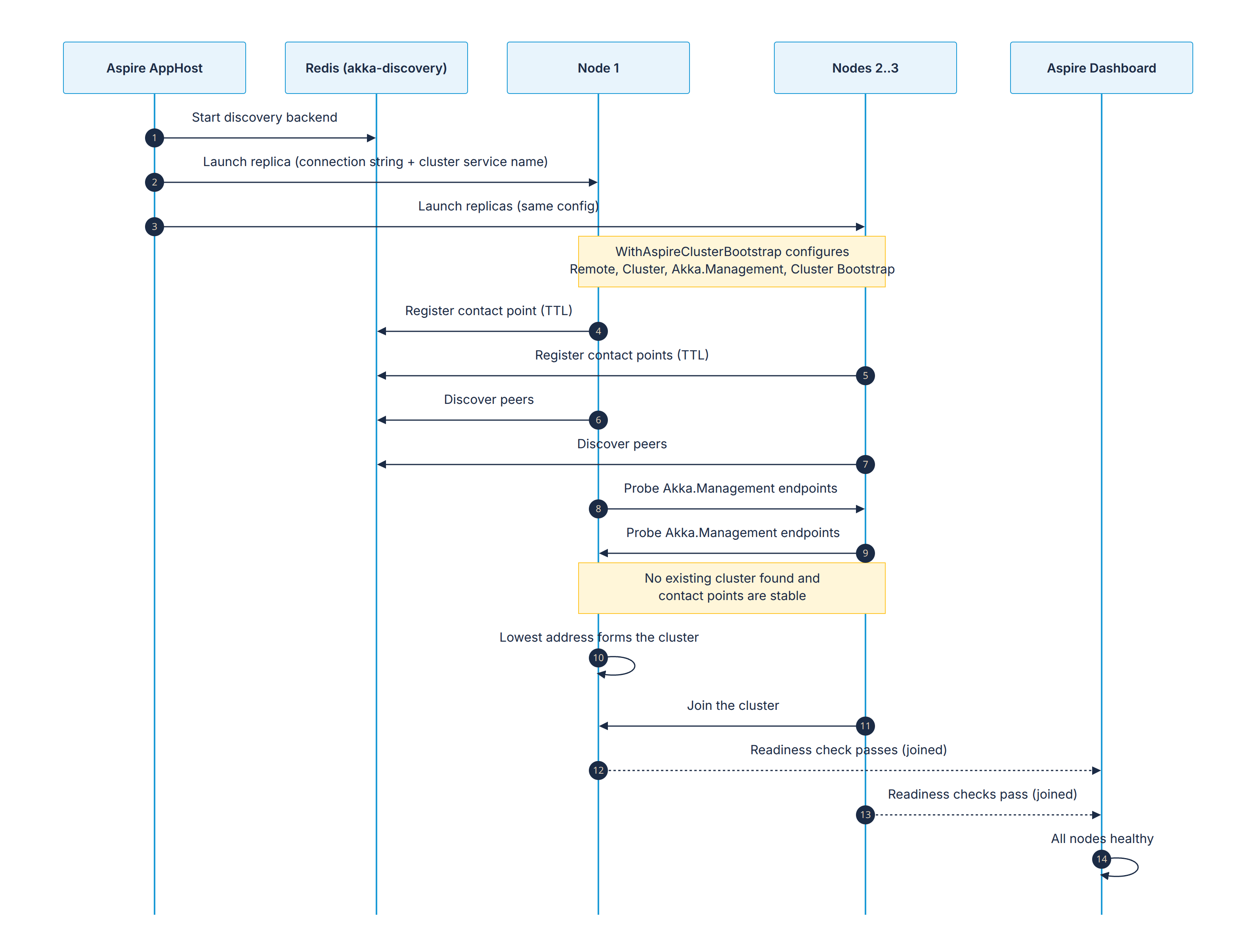
How It Works
Aspire follows the references between all of the resources declared in our AppHost:
- Your applications depend on
akka(the cluster resource); akkadepends on Redis; and- Redis doesn’t depend on anything.
So Aspire boots the resources in this order:
flowchart LR
    R[("Redis<br/>akka-discovery")] -->|healthy| A["akka<br/>cluster resource"]
    A -->|healthy| S["Your apps<br/>WithReplicas(3)"]
Note: Each resource’s health checks, if it declares any, have to pass before Aspire moves on to the next one. That’s why the
Akka.Aspireclient also wires up the built-in health checks included in Akka.Hosting.
Once this is done, the process we outlined in our Akka.Management blog post takes over and runs the dynamic cluster formation process - and crucially, the Akka.Management cluster bootstrap process must complete successfully in order for Aspire to mark these resources as healthy.
Conclusions
Akka.Aspire and Akka.Aspire.Hosting radically simplify the entire development cycle for Akka.NET and make debugging multi-node and multi-service clusters considerably easier than it used to be. This tooling is also extremely useful for coding agents, since it gives them rich runtime, diagnostic, and resource information about your Akka.NET applications - that topic merits its own blog post.
Give our Aspire plugins a try and let us know how well they work for you!
-
In case you missed it, see our blog post and video “Model Context Protocol, Without the Hype” ↩
-
Akka.Discovery.Redisis also a new plugin - we shipped it along with the firstAkka.Aspire.*packages. ↩ -
This code sample is also from the
Akka.ManagementAspire example: https://github.com/akkadotnet/Akka.Management/blob/dev/src/aspire/examples/Akka.Aspire.Sample.Service/Program.cs ↩


Observe and Monitor Your Akka.NET Applications with Phobos
Phobos automatically instruments your Akka.NET applications with OpenTelemetry — traces, metrics, and logs with built-in dashboards.

Enjoyed this post? Subscribe to our newsletter for more insights on distributed systems, Akka.NET, and .NET + AI.
// COMMENTS