// BLOG
Managing Long-Running Tasks Inside Akka.NET Actors
The detached Task + CancellationTokenSource + PipeTo pattern we use in production at Petabridge
Here’s a scenario we hit all the time on TextForge: a new user signs up, connects their Gmail account, and now we have to pull down their entire mailbox history. For the pro plan, that can be hundreds of thousands of emails. Which translates to tens of thousands of Gmail API round trips, exponential backoff when the API pushes back, intermittent network failures, and tens of minutes (sometimes longer) of continuous work per user. And on top of that, we need to be able to cancel the job cleanly, because the pod hosting that actor might get rebalanced across the cluster, or we might roll a deployment, or the user might disconnect the account mid-sync.
So the question is: how can a single Akka.NET actor manage a long-running background job without becoming non-responsive to its own mailbox?
This post (and its accompanying video) walks through the exact pattern we use in TextForge’s MailboxSyncActor: a CancellationTokenSource field, a fire-and-forget PipeTo, and a couple of subtle lifecycle details that will bite you if you skip them.
Why await Isn’t Enough for Long Jobs
I wrote about this in detail back in 2022 in “Async / Await vs. PipeTo<T> in Akka.NET Actors” (video here), so I’m not going to rehash the whole thing. The short version: await is fine inside an actor for quick I/O like a DB lookup or a single HTTP call. But await suspends the actor’s mailbox for the duration of the awaited operation, which means no new messages get processed until the ReceiveAsync handler returns.
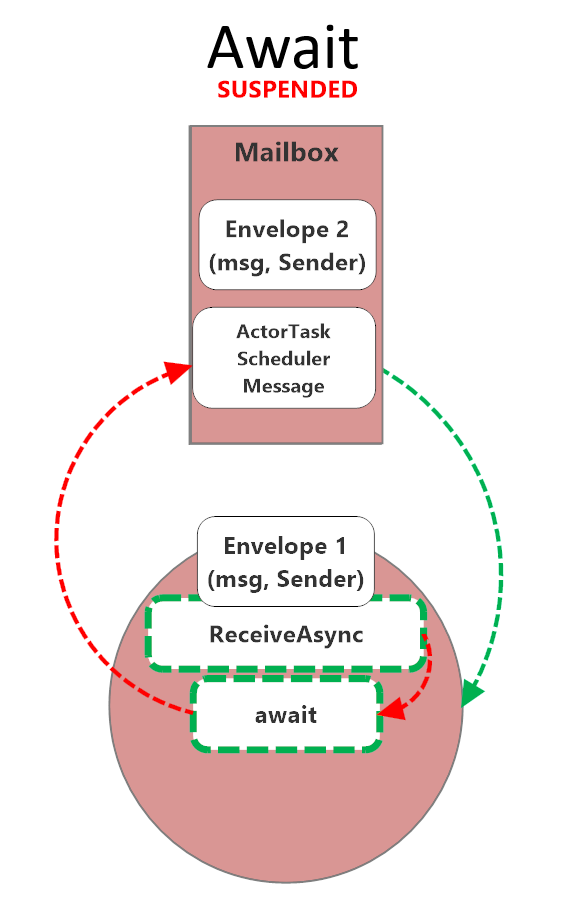 While an actor
 awaits, its mailbox is suspended. No other messages get processed until the handler returns.
For a 20ms DB query, that’s fine. For a 40-minute Gmail sync, it’s a disaster: your actor is effectively dead to the rest of the system for the entire duration of the sync. You can’t ask it for status. You can’t tell it to stop. You can’t send it a new command. Anything you send just piles up in the mailbox behind the suspended handler. And for a job that long, you absolutely need all three of those capabilities, because something will go wrong and you’ll want a way to intervene without killing the actor outright.
The fix is PipeTo, specifically the fire-and-forget flavor where the actor kicks off a detached Task and gets the result delivered back as a regular message when the task completes. The actor’s message loop stays responsive the entire time the work is running.
Here’s the shape of it:
sequenceDiagram
    participant Client
    participant Sync as MailboxSyncActor
    participant Worker as Detached Task
    participant Gmail as Gmail API

    Client->>Sync: StartUserSync
    Sync->>Sync: set _isSyncing, new CTS
    Sync-->>Worker: _ = PerformSyncAsync().PipeTo(Self)
    Sync->>Client: (handler returns immediately)

    Note over Sync: Mailbox stays open
    Client->>Sync: GetSyncStatus
    Sync->>Client: SyncStatus(inProgress)

    loop Long-running work
        Worker->>Gmail: Fetch threads / messages
        Gmail-->>Worker: ...
    end

    Client->>Sync: StopSync
    Sync->>Sync: _syncCts.CancelAsync()
    Worker->>Worker: OperationCanceledException
    Worker-->>Sync: UserSyncCompleted (piped)
    Sync->>Sync: _isSyncing = false
The Four-Point Pattern
We’ve landed on the same four-point pattern every time we’ve had to run a long job from inside an actor at Petabridge:
- Declare a
CancellationTokenSourcefield on the actor so you can cancel the in-flight work from anywhere in the actor’s lifecycle. - Kick off the work with a fire-and-forget
PipeTo:_ = DoWork().PipeTo(Self);. The handler that started the work returns immediately; the mailbox stays free. - Have the actor manage start, cancel, duplicate-guard, and error states as ordinary message handlers. The actor is the coordinator, not the worker.
- Handle the completion result as a regular message. The
Task’s return value gets piped back and the actor processes it like any other message.
Why an Actor at All?
Fair question to ask at this point: if the real work is happening on a detached Task anyway, what is the actor even doing? Why not just kick the job off from a plain old background service?
The actor is the coordinator. It owns the CancellationTokenSource. It enforces one-job-at-a-time per user via a simple bool flag. It handles the completion message when the task pipes its result back. And, because it’s an actor, it’s addressable by entity ID (the user’s ID, in our case), which means the rest of the system has a single well-known place to send StartUserSync, StopSync, GetSyncStatus, and whatever else. When we put this actor behind Akka.Cluster.Sharding, we get per-user singleton semantics across the whole cluster for free, no distributed locks, no “who owns this job right now” database column.
Take the actor out and you have to reinvent all of that yourself. The Task does the work; the actor makes the work manageable.
Production Walkthrough
The rest of the post walks through this pattern as it actually appears in TextForge’s MailboxSyncActor.
The Cancellation Token Source
Start with the state the actor needs to hang onto between messages. There are only two fields: a bool to guard against duplicate start commands, and a nullable CancellationTokenSource that represents the currently running sync. Everything else the sync needs is scoped to the detached task.
private bool _isSyncing;

/// Cancellation token source for the current sync operation.
/// Cancelled on actor stop/restart to abort in-flight async work.
private CancellationTokenSource? _syncCts;
Nothing fancy. The cancellation token source is nullable because there’s no active sync when the actor first starts.
Starting Work: Cancel Previous, Create a New Cancellation Token Source, Fire-and-Forget PipeTo
The StartUserSync handler is where the four-point pattern actually lands on the page. It checks the duplicate guard, rolls the cancellation token source, kicks off a detached local function with PipeTo(Self), and returns. All of that happens in about a dozen lines:
private async Task HandleStartUserSync(StartUserSync cmd)
{
    if (_isSyncing)
    {
        _log.Debug("Sync already in progress, ignoring");
        return;
    }

    _isSyncing = true;

    // Cancel any previous sync and create new cancellation token
    _syncCts?.Cancel();
    _syncCts?.Dispose();
    _syncCts = new CancellationTokenSource();
    var ct = _syncCts.Token;

    // PipeTo is intentionally fire-and-forget:
    // the result is delivered to Self as a message
    _ = PerformSyncAsync().PipeTo(Self);

    // Local async function; runs detached from the actor's message loop
    async Task<UserSyncCompleted> PerformSyncAsync()
    {
        // ... long-running work using ct for cancellation ...
    }
}
A few things worth pointing out here.
The _isSyncing guard is the duplicate-start protection. If someone sends us two StartUserSync commands in a row, we ignore the second one. This matters more than you might think. In a clustered system with retries and at-least-once delivery, duplicates happen.
The _syncCts?.Cancel(); _syncCts?.Dispose(); dance handles the case where a previous sync is somehow still hanging around. Belt and suspenders.
And then the critical line:
_ = PerformSyncAsync().PipeTo(Self);
HandleStartUserSync returns immediately after this line. PerformSyncAsync is an async local function; it runs on the thread pool, not on the actor’s message loop. PipeTo(Self) wires the eventual UserSyncCompleted result back into the actor’s mailbox as a regular message. The _ = discards the Task that PipeTo returns, because we don’t want to await it. Awaiting it here would defeat the entire point.
The handler itself awaits nothing. We still mark it async Task for symmetry with the other handlers on this actor, but you could drop the async keyword without changing any behavior.
Inside the Detached Task: Using the CancellationToken and Linked Tokens
The local function body is where the actual Gmail work happens, and it’s where the CancellationToken earns its keep. Here’s the shape of PerformSyncAsync, with the domain-specific parts stubbed out:
async Task<UserSyncCompleted> PerformSyncAsync()
{
    try
    {
        ct.ThrowIfCancellationRequested();

        // ... resolve services, fetch sync state from DB ...

        // Per-operation timeouts using linked tokens
        using var profileCts = CancellationTokenSource
            .CreateLinkedTokenSource(ct);
        profileCts.CancelAfter(ApiOperationTimeout);
        var profile = await emailService
            .GetProfileAsync(connection, profileCts.Token);

        // ... sync threads and messages ...

        return new UserSyncCompleted(userId, threadsSynced,
            messagesSynced, Success: true);
    }
    catch (OperationCanceledException) when (ct.IsCancellationRequested)
    {
        // Actor is stopping; not an error, just return cancelled
        return new UserSyncCompleted(userId, 0, 0,
            Success: false, "Sync cancelled");
    }
    catch (Exception ex)
    {
        return new UserSyncCompleted(userId, 0, 0,
            Success: false, ex.Message);
    }
}
Two things to note.
The ct.ThrowIfCancellationRequested() at the top is a cheap early-exit. If cancellation came in between when the message was enqueued and when the task actually got scheduled, we bail immediately.
The linked token source, CancellationTokenSource.CreateLinkedTokenSource(ct) combined with CancelAfter(ApiOperationTimeout), is how we impose a per-operation timeout without losing the ability for our outer cancellation to still work. If either the actor-level cancellation token source fires or the operation-level timeout fires, the call is cancelled. This pattern is your friend any time you’re talking to a flaky remote API.
The catch blocks are where the real subtlety lives.
The Subtle Nuance: Distinguishing Our Cancellation from Downstream Timeouts
Look at the catch clause again:
catch (OperationCanceledException) when (ct.IsCancellationRequested)
{
    // Actor is stopping; not an error, just return cancelled
    return new UserSyncCompleted(userId, 0, 0,
        Success: false, "Sync cancelled");
}
catch (Exception ex)
{
    return new UserSyncCompleted(userId, 0, 0,
        Success: false, ex.Message);
}
The when (ct.IsCancellationRequested) exception filter is doing real work here, and it’s very easy to get wrong.
Here’s the trap: HttpClient throws OperationCanceledException (actually a TaskCanceledException, which derives from it) when a request times out. That’s true even when you didn’t cancel anything. HttpClient has its own internal timeout, and Gmail’s API client is sitting on top of HttpClient. So if you just wrote:
catch (OperationCanceledException)
{
    // treat as clean cancellation
}
…you would silently swallow every downstream HTTP timeout as if it were an intentional shutdown. That is exactly the kind of bug you don’t find until production, because everything looks fine. No exceptions, no noisy logs, just syncs that quietly stop partway through and report success.
The fix is the filter: when (ct.IsCancellationRequested). That says “only treat this as a clean cancellation if the cancellation token we actually own has been fired.” If ct is still healthy and we see an OperationCanceledException, it came from somewhere downstream (probably some HttpClient’s internal timer) and it falls through to the general catch (Exception) block, where it gets reported as a real error.
Subtle, but it’s a real footgun. Spell it out in your code.
Explicit Stop Command
Users (and the rest of the system) can ask an in-flight sync to stop:
private async Task HandleStopSyncAsync(StopSync cmd)
{
    if (_syncCts != null)
    {
        await _syncCts.CancelAsync();
        _syncCts.Dispose();
        _syncCts = null;
    }
    _isSyncing = false;
    // ... cleanup ...
}
Because this runs inside a ReceiveAsync handler, we use await _syncCts.CancelAsync(). That’s the .NET 8+ idiom for cancelling without tying up the caller’s thread on synchronous continuations registered with the token.
Note that cancelling the cancellation token source doesn’t immediately kill PerformSyncAsync. The detached task will keep running until the next ThrowIfCancellationRequested or the next await on a token-aware operation. That’s fine. Eventually it’ll hit a cancellation check, throw, fall into the clean-cancel catch, and pipe a UserSyncCompleted(Success: false, "Sync cancelled") message back to the actor.
Lifecycle Cleanup via PostStop
The part that’s easiest to forget:
protected override void PostStop()
{
    // Cancel any in-flight async sync operation
    _syncCts?.Cancel();   // Sync Cancel(), not CancelAsync()
    _syncCts?.Dispose();  // because PostStop is synchronous
    _syncCts = null;

    base.PostStop();
}
Two things to notice.
First, we use synchronous Cancel() here, not CancelAsync(). That’s because PostStop is a synchronous lifecycle hook; there’s no PostStopAsync in Akka.NET. Don’t try to .Wait() or .GetAwaiter().GetResult() on CancelAsync() inside PostStop; just use the synchronous version.
Second, and this is the important part: why do we bother cancelling in PostStop at all if we already handle cancellation in HandleStopSyncAsync? Because actors don’t only stop via StopSync. During cluster shard rebalancing, an actor can get shut down without ever receiving a StopSync message. If you don’t cancel the cancellation token source in PostStop, the detached PerformSyncAsync task keeps running. It keeps hammering the Gmail API, keeps burning through rate limits, and then eventually tries to PipeTo its result back to a mailbox that no longer exists. No crash, exactly, but a lot of wasted work and some noisy dead-letter logs.
Cancelling in PostStop stops the runaway task as soon as it hits its next cancellation checkpoint. Do this every time.
Real-World Uses
This exact pattern isn’t unique to email sync. We’ve shipped variations of it for Petabridge customers across a bunch of different domains: media transcoding pipelines, ETL jobs reading from one system and writing to another, long-running report generation, batch imports. Any time you have “a single logical unit of work that takes minutes to hours and has to be cancellable,” this is the shape the solution takes.
Open Source Code Sample
If you want to play with this pattern yourself, we’re publishing a simplified version in the Petabridge code samples repo: a CSV import job using Akka.Streams and Bogus for fake data. Same four-point pattern, much smaller surface area, clone-and-run locally.
petabridge/akkadotnet-code-samples → src/async/long-running-tasks
Recap
The pattern, in five bullets:
awaitblocks flow control in actors. It’s fine for quick I/O; it’s a mistake for long-running work. Use it when the operation is measured in milliseconds, not minutes.PipeTois non-blocking at both the thread level and the flow-control level. The detached task runs on the thread pool, and the actor’s mailbox stays open for new messages while the task runs.- The shape is:
CancellationTokenSourcefield +_ = Work().PipeTo(Self);+ proper lifecycle cleanup. State in the actor, work in the detached task, result back as a message. - Always handle cancellation gracefully in the detached task, and use
when (ct.IsCancellationRequested)to distinguish intentional cancellation from downstream HTTP timeouts. That exception filter is not optional. - Always clean up in
PostStop. Shard rebalances don’t sendStopSyncmessages. If you only cancel in your explicit stop handler, you’ll leak runaway tasks during cluster events.
That’s it. If you’re running into trouble managing long-running jobs inside an Akka.NET application, or you want hands-on help designing systems like this, Petabridge offers support and consulting for Akka.NET teams.


Observe and Monitor Your Akka.NET Applications with Phobos
Phobos automatically instruments your Akka.NET applications with OpenTelemetry — traces, metrics, and logs with built-in dashboards.

Enjoyed this post? Subscribe to our newsletter for more insights on distributed systems, Akka.NET, and .NET + AI.
// COMMENTS